

atst
Menu bar translator: select text in any app, press a hotkey and read the translation in a tooltip.GetApache-2.0
Menu bar translator for text selected in any Mac app, with one shortcut and Apple on-device translation by default.
MIT · Free download · Downloads from github.com
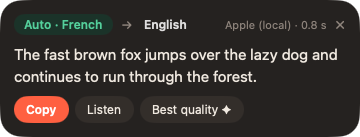
mPARLE translates whatever text you have selected, in any app, without switching windows. Select a sentence, press Option-T, and a small bubble appears next to the cursor with the translation, the detected source language and the engine used. From the bubble you can copy the result, listen to it, or replace the selected text in place when the field is editable.
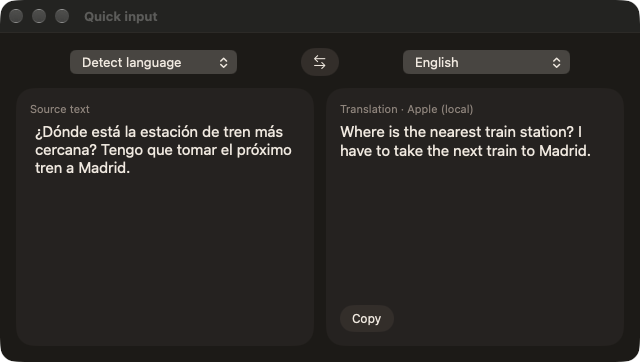
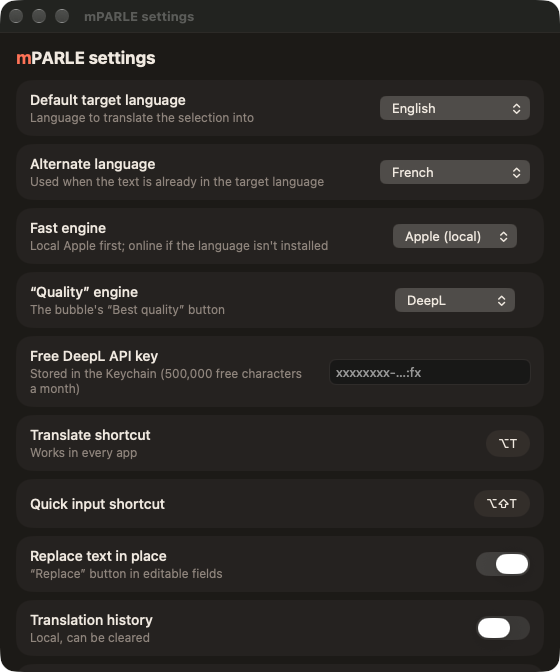
A second shortcut, Option-Shift-T, opens a quick input window for typing or pasting text, and the app also adds a Translate with mPARLE entry to the macOS Services menu. The target language is set once in the settings. If the selected text is already in that language, mPARLE translates it into a second language you choose instead. An optional history is kept locally and can be cleared.
The default engine is Apple's on-device translation, which runs offline once the language pair is downloaded from the settings. Alternatives are Google, DeepL with your own free API key kept in the Keychain, and a local model served through an OpenAI-compatible endpoint such as Ollama. The Google engine needs no key. Google and DeepL receive the text, so choose the Apple engine to keep it on the Mac.
mPARLE reads the selection through the Accessibility permission, so macOS asks for it on first use. The interface is in French, English, Spanish and Italian, with light and dark appearance, and it checks GitHub releases for updates. The release build is for Apple silicon and requires macOS 26, and the app is Developer ID signed and notarized.
OpenMacApps links to each project’s official download. Requirements are for the current release and can change with the next one. The verification date records our license and source review, not a security audit. Read how we verify.
License and artwork notices
Link to this page from your README with a badge.

[](https://openmacapps.com/apps/mparle/)