

ntfsmac
A menu-bar app that mounts NTFS and ext4 drives read/write on Apple silicon Macs through a small Linux virtual machine.GetMIT
Mounts external NTFS disks read-write through macFUSE and NTFS-3G, with auto mount per disk, verified copying and safe ejection.
MIT · Free download · Downloads from github.com
macOS blocks the first launch of apps that Apple has not checked. Open ezNTFS once, then choose Open Anyway in System Settings under Privacy & Security. Do this only if you trust the download source.
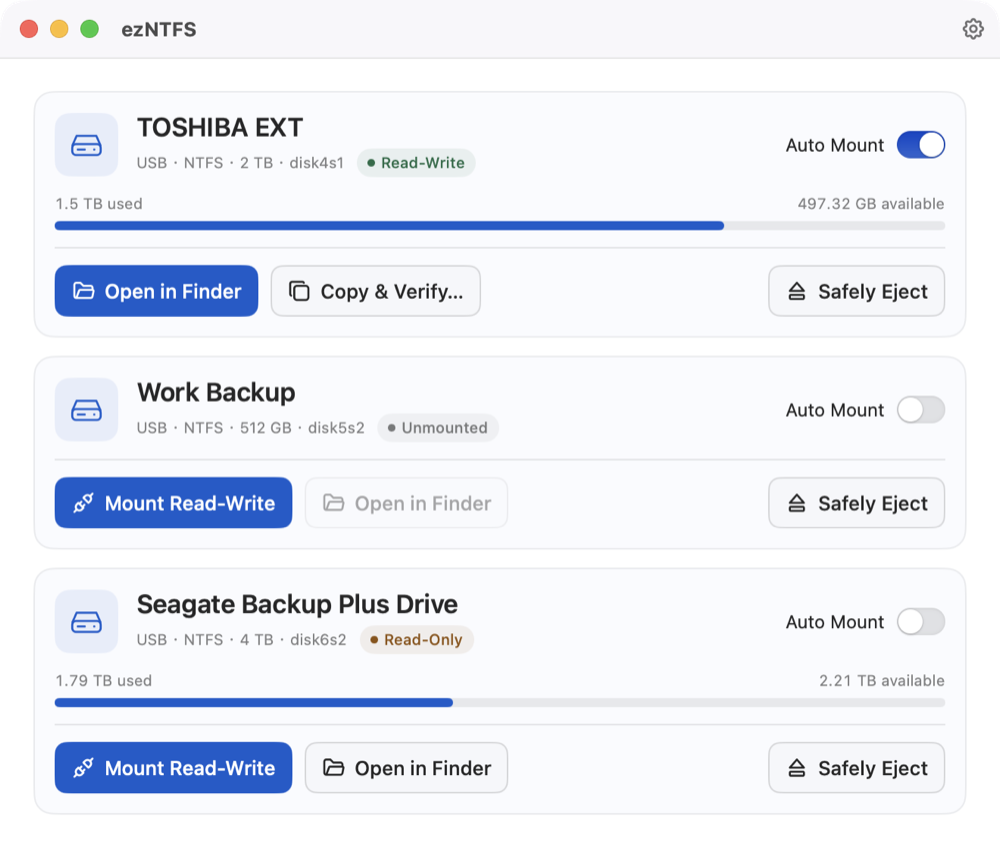
ezNTFS lets a Mac write to external disks formatted as NTFS, the Windows file system that macOS only reads. Each connected disk gets a card with its size, free space and state, and a button to mount it read-write. Turn on Auto Mount for a disk and it is mounted that way each time it is connected. The app stays in the menu bar when its window is closed.
Copy & Verify copies files and folders one at a time, then reads every copy back and checks its SHA-256 digest before the batch appears in a new folder. Safely Eject ejects the whole physical disk with all its volumes.
The work is done by NTFS-3G on top of macFUSE. It needs more setup than most apps:
The service accepts requests only from the ezNTFS app and its command-line tool, and macOS may ask you to grant it raw disk access in Privacy & Security.
The app's code is under the MIT license; the bundled NTFS-3G driver is GPL-2.0 and ships with its source. The ntfsmac app, also in this catalog, mounts NTFS through a small Linux virtual machine instead of macFUSE.
It needs macOS 14 or later on Apple silicon. In version 0.5.0 the app is ad-hoc signed and the package is neither signed nor notarized; the release page lists SHA-256 checksums. The only network request is the update check against GitHub.
OpenMacApps links to each project’s official download. Requirements are for the current release and can change with the next one. The verification date records our license and source review, not a security audit. Read how we verify.
Link to this page from your README with a badge.

[](https://openmacapps.com/apps/ezntfs/)