

Lyrimuse
Word-by-word synced lyrics for Apple Music, Spotify and other players, shown on the desktop, menu bar or notch.GetGPL-3.0
Docks the Picture in Picture video from Safari or Chrome into the MacBook notch, so it stops covering your work.
GPL-3.0 · Paid download · Downloads from github.com
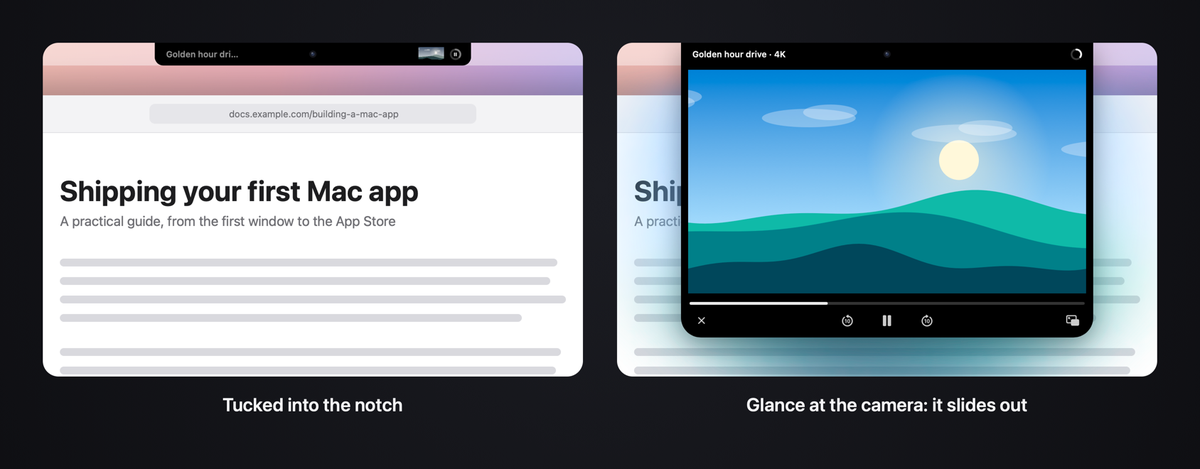
Start Picture in Picture on a video in Safari or Chrome, and CineNotch pulls that floating window up into the MacBook notch. There it shrinks to a black pill with a live thumbnail, the title and a progress ring. Hover the pill, or look at the camera, and the video slides down at full size. Look back at your work and it tucks away again while the sound keeps playing.
The glance control needs a short calibration and the camera. The developer says frames are analyzed on the Mac and never stored or sent anywhere, and the camera runs only while a video is docked. It is optional. The mouse works without it.
On Macs without a notch, the same pill is drawn in the menu bar. The project calls its status early. For now it handles Safari and Chrome on a single screen, and there is no close button for Chrome's video.
The signed and notarized download needs macOS 14 or later and runs on Apple silicon and Intel. It asks for Accessibility and Screen Recording permissions so it can find the Picture in Picture window and show it. Unlocking the signed build takes a one-time license, while the GPL-3.0 source can be built with Swift 5.9 or later at no cost.
OpenMacApps links to each project’s official download. Requirements are for the current release and can change with the next one. The verification date records our license and source review, not a security audit. Read how we verify.
License and artwork notices
Link to this page from your README with a badge.

[](https://openmacapps.com/apps/cinenotch/)